M-VAVE FM-1: Official FM1 Open vs. Stock V15
On October 14, M-VAVE pinned a post about FM1 Open on its official forum: a second official firmware option for the FM-1, with a browser workbench and source code. In short, stock V15 is an FM synth; FM1 Open turns it into an 8-track groovebox.
My FM-1 is on stock V15 (I wrote about the upgrade in my previous post). I haven't flashed FM1 Open yet, only played with it in the browser workbench. So this comparison is put together from the official announcement, the manual and online discussions; I don't know yet how it actually runs on the hardware.
Why FM1 Open exists
After the FM-1 came out this summer, the community found a way to flash its firmware. Lots of people wrote firmware with AI help, and 60 to 90-plus custom firmware projects appeared within three weeks (counts vary); the better-known ones are Felucca, SLOOP and X0X. Instead of locking the hardware down, M-VAVE released its own official open firmware, which you could see as a response to this wave.
A note on version numbers: the latest FM1 Open is Open V14 (released 10/19). That's Open's own numbering and has nothing to do with the stock firmware's V14.
What's new
| Item | Stock V15 | FM1 Open (Open V14) |
|---|---|---|
| Sound engines | 6-OP FM only (32 algorithms, up to 12-voice polyphony) | 6: DX7-style FM, 303 bass, 808 drums, PSG chip sound, plucked string, sampler |
| Simultaneous parts | 1 patch | 8 tracks, each with its own engine, volume, mute/solo and separate reverb and delay sends |
| Patch library | 128 (four banks A–D of 32 each) | 128 DX7 patches, the stock V15 patches by default; DX7 .syx files can be imported |
| Sequencer length | 16 steps; step count selectable since V15 | 16/32/48/64 steps per track, and tracks can have different lengths |
| Sequencer editing | one note per step, recorded in order; V15 added long notes and chaining 1–16 patterns | per-step velocity, gate, trigger probability, chords, tie and parameter locks; swing, metronome, count-in, live recording |
| Arpeggiator | yes, but not at the same time as SEQ (it shows "Disable SEQ to enter") | the arpeggiator / drum roll works together with the sequencer |
| Storage | 16 patterns | 16 demo projects plus 16 user projects, each with 8 tracks |
| Effects | 6-slot effect chain: Filter, Reverb, Delay, Distortion, Chorus, Phaser, in an adjustable order | only reverb and delay, with separate reverb and delay sends on each track; the only distortion is the 303 engine's own drive |
| Sampling | none | 8 slots sharing about 20.45 seconds; WAV import from a computer |
| Connectivity | USB MIDI, Bluetooth (the manual only says a long press on HOME switches Bluetooth on or off, not whether it carries audio or MIDI) | USB MIDI, MIDI IN, BLE MIDI, sync to external MIDI Clock, and it works as a USB audio interface that sends its sound to the computer |
| Tempo | 30–300 BPM | adds Tap Tempo; delay can sync to tempo |
| MIDI routing | receive channel selectable | each track can be set to NORMAL/PLAY/OFF, with its own MIDI input channel and output routing |
| Computer software | only M-UPGRADE, for flashing firmware | a browser workbench for editing patches, projects and samples and saving them to the computer |
The details for stock V15 come from the FM-1 manual and the release notes I collected in my previous post; the details for Open come from the official announcement.
Open loses some effects. Stock has a 6-slot effect chain (Filter, Reverb, Delay, Distortion, Chorus, Phaser) whose order you can change; Open has only reverb and delay, and each track has its own send level for both. I went through the source on GitHub: the project file stores just 4 bytes of effect parameters (reverb length, delay time/feedback, output level), the effects page on the device only has REV TIME, REV SEND, DLY TIME and DLY SEND, and searching the whole repo for chorus, phaser or distortion turns up nothing. For distortion you only have the 303 bass engine's own drive.
The browser workbench
The workbench is at open.m-vave.com/fm1-workbench; M-VAVE says it needs desktop Chrome or Edge. Without connecting the device you can listen to the demos, switch engines, and change patches and beats, so you don't have to flash anything to find out whether Open is fun.
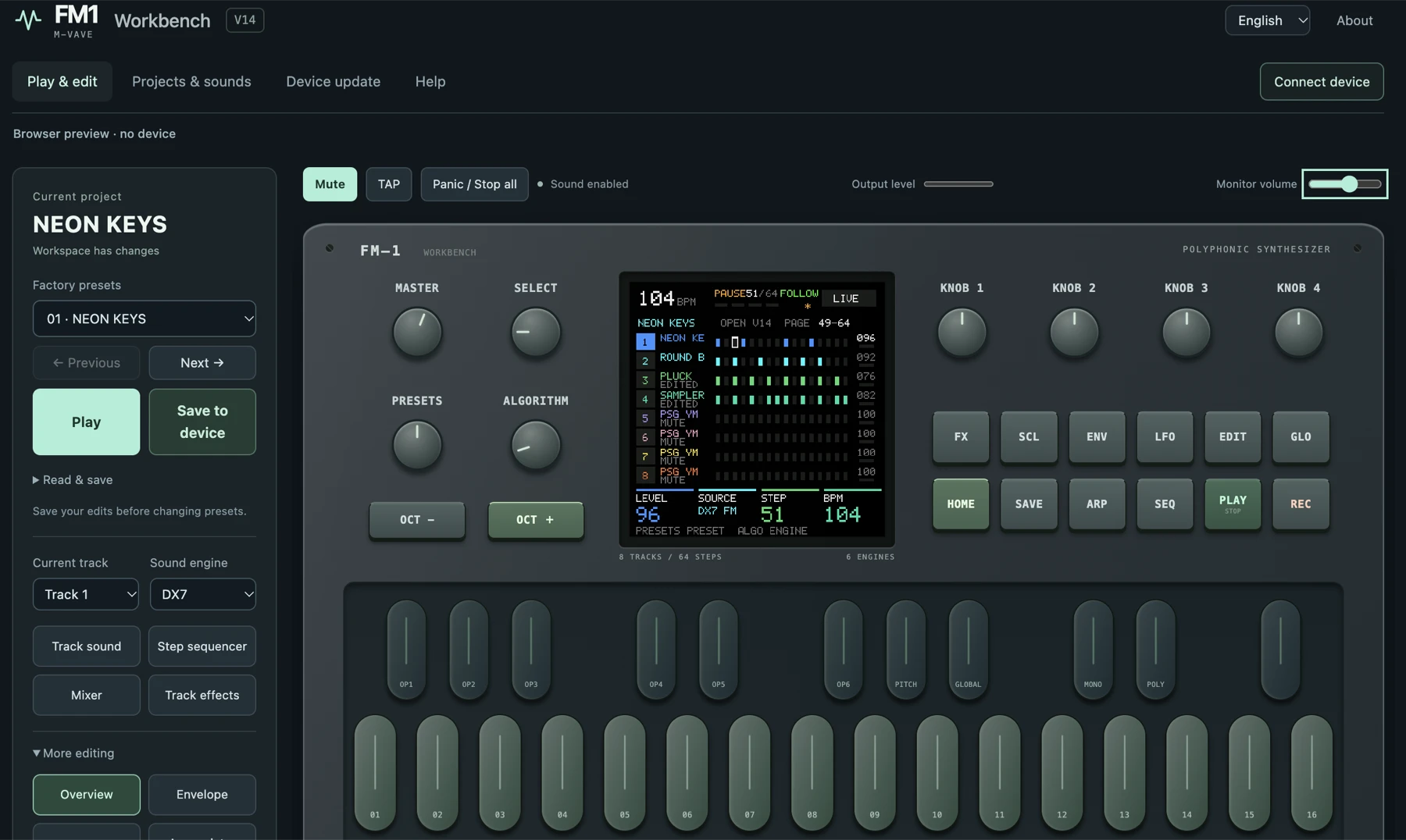
Since I'm still on the fence, I've only played with the workbench a little and haven't actually flashed it onto my FM-1. Judging just by the workbench's emulated screen, the interface looks much nicer than the stock firmware's. If all the music in those demos can really be made with this firmware on the hardware, that's pretty exciting. (Though that's true of the other third-party firmware too.)
An FM-1 on stock V15 apparently can't connect to the workbench. Several people on the forum clicked connect and all got "Device did not respond. Check USB and project-library firmware support". The fix posted on Reddit: first flash the Open firmware from the workbench with "Force flash"; after that it connects. In other words, connecting the device in the workbench really means flashing it (I haven't tried this).
Before you flash
- Stock and Open project and sample formats aren't compatible, so stock patterns and edited patches don't carry over; back them up first
- After flashing Open,
.fm1project files don't include sample audio, so samples have to be exported separately as.fm1s, and the four DX7 patch banks A–D have to be exported separately - M-VAVE itself warns that flashing may cause data loss or leave the device unable to boot; don't unplug USB, cut the power or close the web page while flashing
- The workbench has a built-in function to restore stock V15 and the 128 factory patches, so there's an official way back to stock
- Someone reported that after flashing Open they couldn't flash other custom firmware. The forum suggestion was to flash back to stock V15 with the desktop M-UPGRADE first and then flash, but the person who reported it didn't say whether that worked
- Someone else ran into the website detecting their FM-1 as an SMK, which blocked downgrading; doing it from the FM-1-specific page solved it
- A week after launch (10/21), GitHub still had 7 open issues, such as Quick Edit in Open V14 showing the wrong FM patch number
I happen to have the stock V15 firmware file and M-UPGRADE (left over from flashing V15 in my previous post), so if I do brick it, at least I know how to get back to stock.
Controversies
FM1 Open has mostly been well received; The Synth Source calls it "a sensible and, for this price class, rare response". But there are two controversies:
- No attribution: Synth Anatomy criticized the official firmware for closely resembling community firmware and for using open-source projects such as Dexed without saying so at first. Later versions added copyright notices
- Only half open: the source is GPLv3, but the core audio engine
libfm1_engine.ais a closed binary, and building only works on Windows x64 with the vendor's toolchain. Charles Vestal, the author of X0X and Felucca, pointed out on GitHub that distributing his GPL code together with the closed binary was a licensing problem. M-VAVE replied that it would temporarily take the open-source project offline while it looked into the licensing; after the Open V12 update on 10/16 he said the issue was resolved
If you just want to play, none of this affects you; if you want to modify the firmware yourself, note that you can't build it on a Mac.
Should you try it?
- If you only use the FM-1 as an FM sound module, played from an external keyboard or a DAW: stock V15 is enough; fewer features, but stable
- If you want the FM-1 to make a whole track on its own (drums, bass, chords, melody): Open is a big upgrade, but it only came out on 10/14, so be ready for bugs
Open-source firmware is a genuinely good thing, but I haven't had time to dig into it, so I don't have much to say about it yet. I'll keep watching from the sidelines and following the news.
References
- FM1 Open announcement (official M-VAVE forum)
- GitHub: m-vave/fm1_open
- GitHub issue #1: GPL and the closed libraries in the SDK
- FM1 Open: M-VAVE's official answer to the FM-1 custom firmware boom (The Synth Source)
- M-VAVE FM-1 Open: the green light for custom firmware and community hacks (Synth Anatomy)
- Forum: Device did not respond
- Reddit: the fix for the workbench's "Device did not respond" error
- aroum/fm1-custom-fw: a list of custom firmware and tools