M-VAVE FM-1 Panel and Basic Operation (V16)
I think I've had my FM-1 for a few months now, and so far I've only flipped through the built-in presets and played it like an electronic keyboard. This time I want to learn it properly, so I'm starting with the panel; that's the most basic part, after all.
This post goes through the FM-1's knobs, buttons, screen and rear jacks one by one, and ends with a run through the basic flow: power on → pick a preset → change octave → save. Sound design, effects and the sequencer each get their own post.
The manual on the official site (the 2026-08-21 edition, 31 pages) still describes V15. Where V16 changed things, I filled in from the official release note and what's on the unit, and I point out the differences.
Setup
- FM-1 firmware: V16 (upgraded from V15 on 2026-10-22; see the firmware upgrade guide)
- References: the official manual, 2026-08-21 edition, and the V16 release note
- Headphones: ordinary flat-head earbuds, FAAEAL 臻聲 鳶尾 紀念版
Panel overview
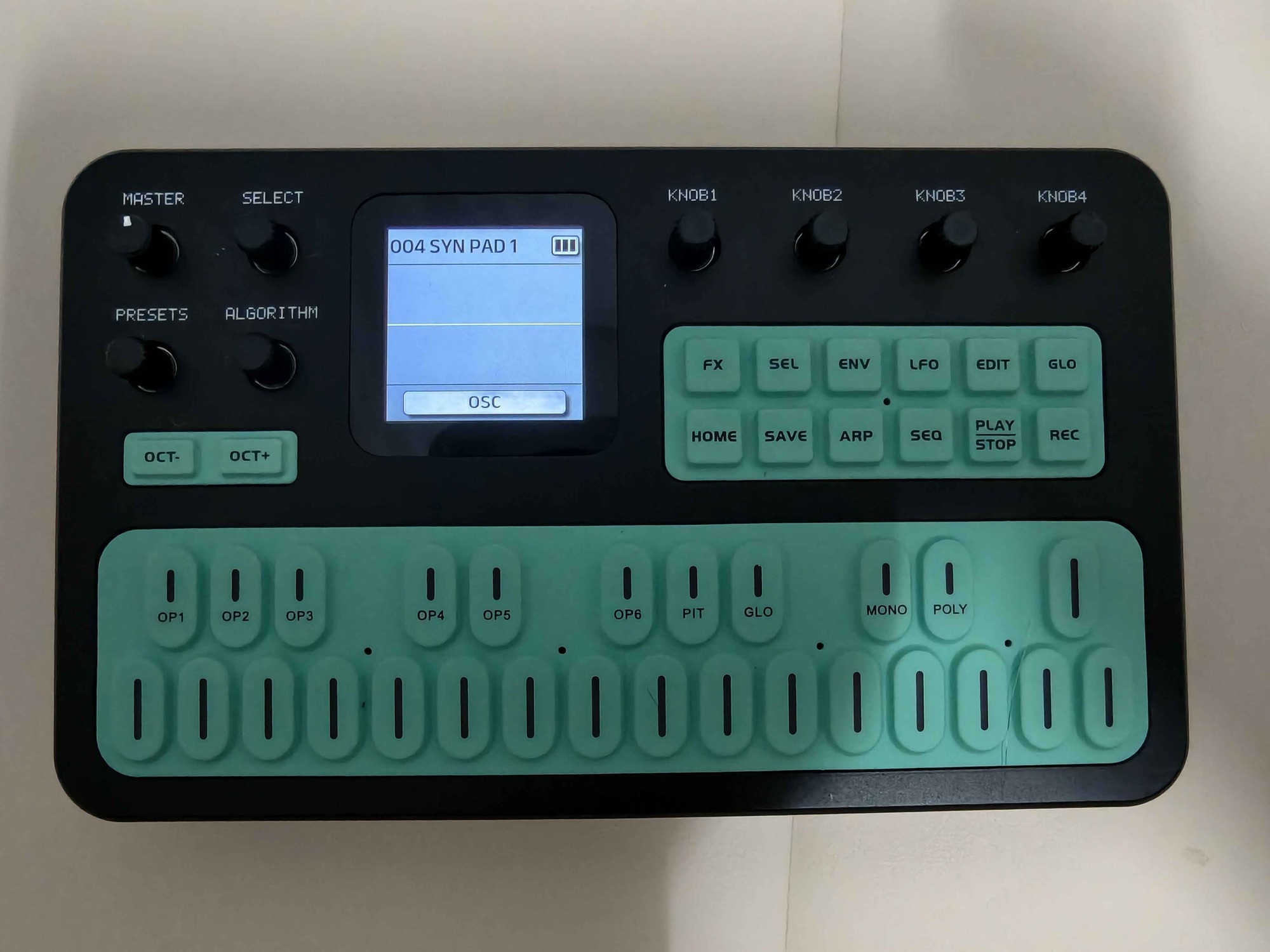
The front of the FM-1 has three areas: the volume knob and three large knobs on the left, the screen in the middle, and four parameter knobs and two rows of function buttons on the right, with a 27-key keyboard below. In total that's 1 volume knob, 7 endless encoders (the kind that never hit an end stop) and 41 buttons (27 keys, 12 function buttons, OCT−/OCT+). These numbers match the panel-scanning setup in the FM1 Open source code (41 buttons, 7 encoders).
Left: volume and the three large knobs
| Knob | What it does |
|---|---|
| MASTER | Main volume, the only knob with end stops (300°) |
| SELECT | Switches pages in the current mode; the bottom of the screen shows page numbers such as 1/2 and 2/2. In FX mode it selects the effect slot instead |
| PRESETS | Switches among the 128 presets (001–128). Each click changes the preset immediately, and turning past 128 wraps back to 001 |
| ALGORITHM | Selects one of 32 algorithms; the screen draws how the 6 operators are connected |
ALGORITHM has a second job: hold OCT− or OCT+ and turn it to transpose, from −12 to +12 semitones.
What changed in V16:
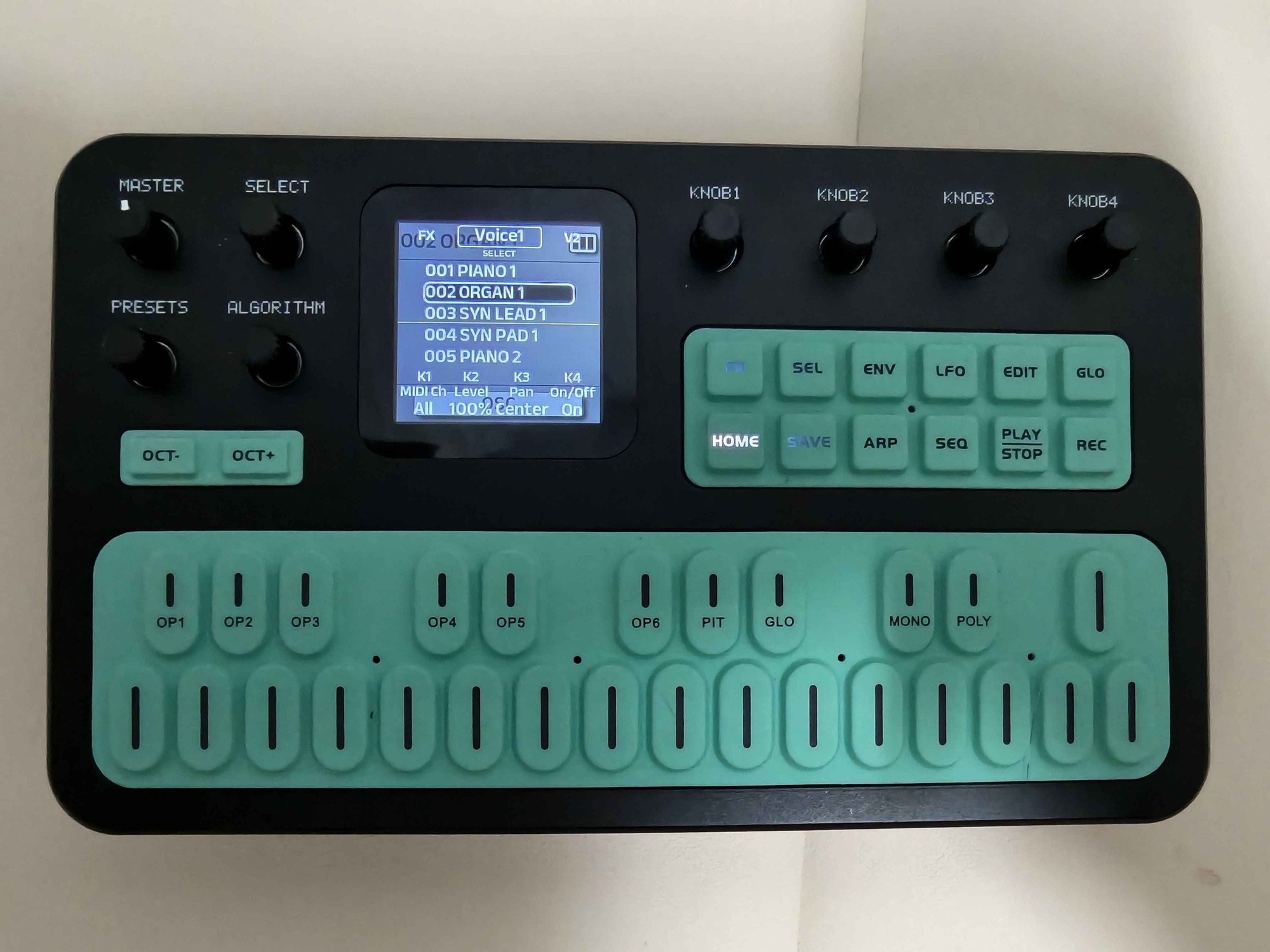
- The PRESETS pop-up now has a row on top with
FX,Voice1,V2…; turn SELECT to switch between them. This is the biggest change in V16: the FM-1 goes from one preset at a time to 8 Voices (Voice1–8) at once, each with its own preset. With FX selected, PRESETS switches the effect setting shared by all 8 Voices (FX001–FX128) - With a Voice selected, K1–K4 below map straight to that Voice's MIDI channel, level, pan and on/off. Voice1 defaults to
MIDI Ch: All,Level: 100%,Pan: Center,On/Off: On - You can use the 8 Voices to layer sounds (piano plus pad, for example), or give them different MIDI channels so the FM-1 plays several parts at once. The 20 notes of polyphony are shared by all 8 Voices. How to layer sounds, and my pan measurements, are in a separate post
- The pop-up closes after about 3 seconds of inactivity (the manual says about 1 second for V15). Once it closes, K1–K4 no longer control the Voice, so keep an eye on the numbers on the screen while you turn
- In FX mode, ALGORITHM now selects the shared FX setting (FX001–FX128)
Middle: the 1.54-inch screen
The screen has three areas:
- Top: the current preset number and name, such as
004 SYN PAD 1, with the battery in the top-right corner - Middle: parameters, the oscilloscope waveform, the effect grid or the algorithm diagram, depending on the mode. The home screen is an oscilloscope, a flat line when you're not playing
- Bottom: the mode name and page number, such as
1/2 LFO; on the home screen it readsOSC
The small pop-ups for changing presets or algorithms, or adjusting the octave, disappear on their own. The manual says about 1 second, but on V16 it feels more like 3 seconds to me.
Right: K1–K4 and the function buttons
What the four knobs K1–K4 control depends on the mode, and the bottom of the screen always shows what each one does right now, so there's nothing to memorize.
The function buttons come in two rows:
| Top row | What it does |
|---|---|
| FX | Effect chain: six slots for Filter, Reverb, Delay, Distortion, Chorus and Phaser |
| SEL | Only works in FX mode: grab an effect slot and turn SELECT to change the order |
| ENV | Amplitude envelope |
| LFO | Low-frequency oscillator |
| EDIT | Operator editing; the keys turn into menu keys such as OP1–OP6, PIT and GLO |
| GLO | Global settings (GLOBE) |
| Bottom row | What it does |
|---|---|
| HOME | Back to the home screen; long-press to turn Bluetooth on or off |
| SAVE | Save |
| ARP | Arpeggiator |
| SEQ | Sequencer |
| PLAY/STOP | Sequencer play/stop; in V16 a long press is Panic, which clears stuck notes |
| REC | Sequencer record |
PLAY/STOP and REC only work while SEQ is on; otherwise the screen shows "Enable SEQ first".
GLO (global settings)
V16 reorganizes GLOBE into 5 pages, switched with SELECT: Voice1–4, Voice5–8, play/connection, display settings, and data management. The bottom of the screen reads 1/5 Globe through 5/5 Globe.
The first time I went in, I was looking for Effect Ch (the MIDI channel a computer uses to control the effects). I found it on page 3 (3/5 Globe, play/connection), set to 2, which matches the default in the official MIDI document.
The first two pages hold the settings for Voice1–8, including each Voice's on/off switch. Once I went into GLOBE just to look around, and when I came out the whole unit had gone silent. It turned out Voice1 had been switched Off: I must have bumped a knob while flipping pages, and since Voice2–8 are Off by default, turning Voice1 off silences everything. To turn it back on, turn PRESETS to bring up the pop-up, select Voice1 and turn K4 back to On. If you don't save this setting, a restart also brings it back.
The last page (5/5 Globe) is data management, with only three items: Bank Export (exports a bank of 32 presets in DX7 format), Reset Patches (restores the factory presets) and Version (the firmware version; mine shows 016).
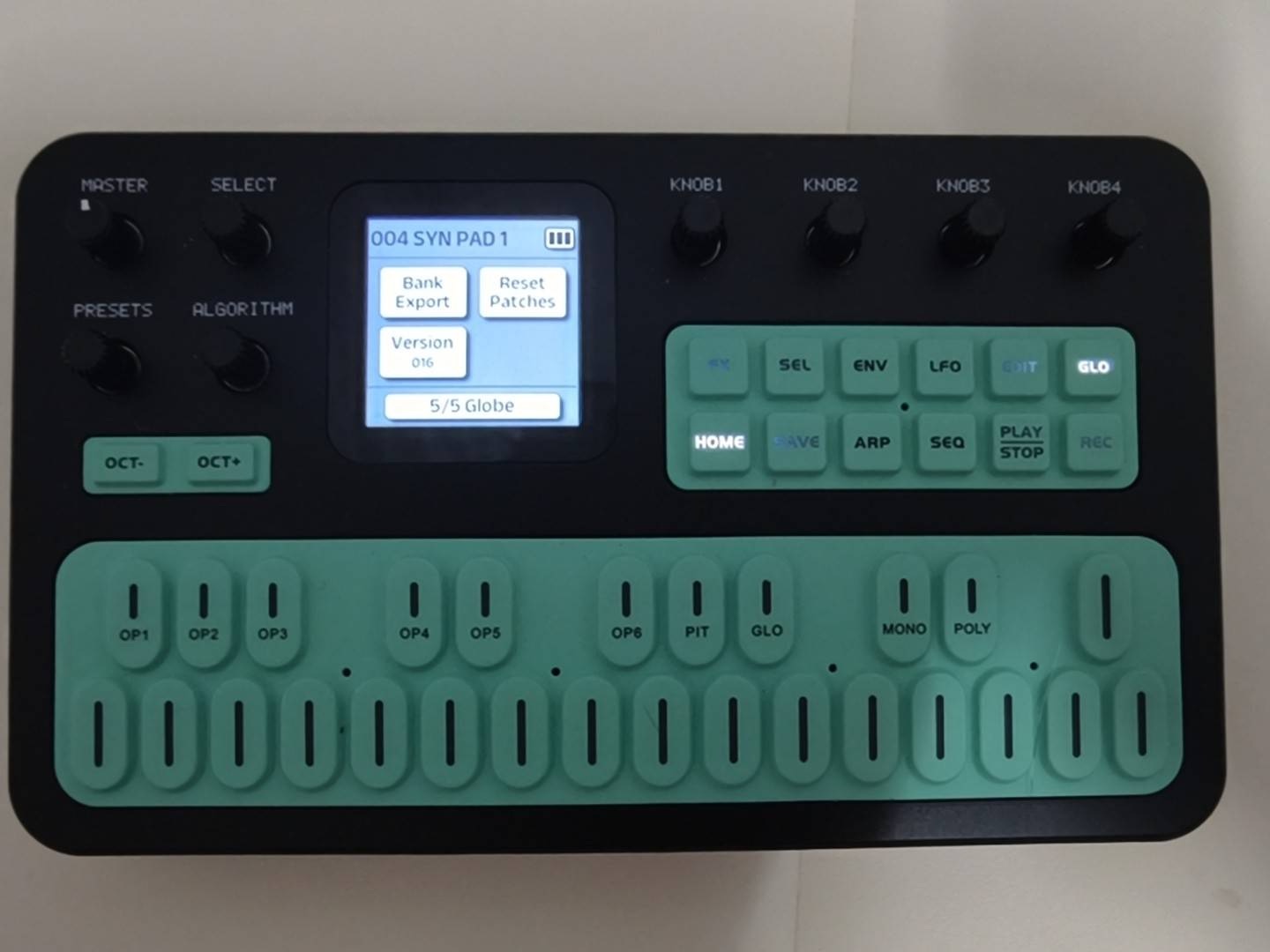
Don't fiddle with the knobs on this page. On V15, Reset Patches restores the presets once you turn it and then confirm with K4. Whether V16 still has the confirmation screen, I haven't tried (and don't plan to).
Bottom: the 27-key keyboard
- The default range is roughly F3–G5, and every key has a light
- OCT−/OCT+ shift by one octave per press, from −3 to +3. The light next to them: slow blink at ±1, fast blink at ±2, solid at ±3
- Press OCT− and OCT+ together to reset both octave and transpose to zero
- The keys are in two rows: 16 white keys in the lower row and 11 black keys in the upper row, 10 of which have small labels printed on them (clearest in the photo)
- In EDIT mode, those labelled black keys in the upper row become menu keys: OP1–OP6, PIT (pitch envelope), GLO (the preset's algorithm, feedback and so on), MONO and POLY. This GLO is the label on a key, not the GLO function button
The keys are easy enough to press, but however soft or hard I pressed, I didn't notice velocity making any difference to the sound.
Later I connected the FM-1 to the computer and read the MIDI coming straight from the keys: I played a round softly and a round hard, and all 39 notes had a velocity of 90. So the FM-1's silicone keys don't sense velocity; every note sends the same value. The manual lists a Velocity setting (1–127) in GLOBE, described as "overall keyboard velocity", and 90 is probably that setting (I didn't change it to check).
For velocity response you need an external velocity-sensitive keyboard playing the FM-1 over MIDI. The preset itself has to respond as well, though: every operator has KeyVelocity (0–7), and if it's set to 0, the sound won't change however hard you play the external keyboard.
Rear jacks
The rear jacks are tiny and my own photos weren't clear, so here is the diagram from the official manual.
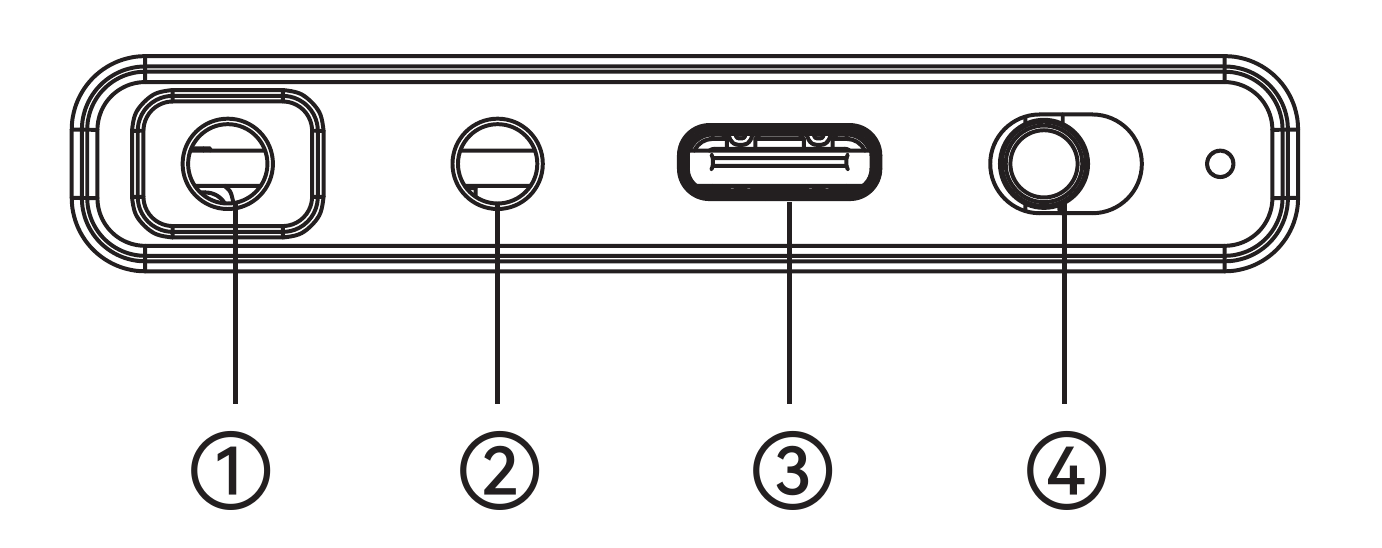
| # | Jack | Notes |
|---|---|---|
| ① | 3.5 mm audio out | Only takes two-ring (TRS) plugs; three-ring plugs on headphones with a microphone, such as Apple EarPods, don't work. The manual also says other plugs may cause noise, and the speaker won't mute automatically |
| ② | 3.5 mm MIDI IN | Needs a 3.5 mm-to-MIDI adapter cable |
| ③ | USB-C | Power, USB MIDI and USB audio (on a Mac it shows up as "FM-1 Audio", 2 in / 2 out, 44.1 kHz) |
| ④ | Power switch |
There's a built-in speaker, which mutes automatically when you plug in headphones. Note that the built-in speaker plays only the left channel, so a preset panned to the right can't be heard through it (measurements in the layering and pan post). The battery is 2000 mAh and the manual says 12 hours. I usually only play for about 10 minutes at a time and have never used it for long stretches, so I don't know yet how long it actually lasts.
It has both kinds of Bluetooth: the manual describes BLE MIDI, and the "Bluetooth accompaniment" in the V16 release note is Bluetooth audio, which can be mixed into the USB recording together with the synth.
Basic operation
-
Power on: flip the power switch on the back. It starts on the oscilloscope screen with whatever preset is stored in Globe. If you've never saved Globe, that's
001 PIANO 1, so if you only turn PRESETS to a different preset without saving, the next power-on goes back to 001. I switched Voice1 to005 PIANO 2, saved Globe, and after a restart it came up on 005 (saving is step 6) -
Pick a preset: turn PRESETS; each click changes it, and turning while playing is quickest. Stop for about 3 seconds and the preset list pop-up disappears
-
Change octave: press OCT− or OCT+. The light beside them behaves as the manual says: slow blink at ±1, fast blink at ±2, solid at ±3. Press OCT− and OCT+ together to reset both octave and transpose to zero. At −3 you clearly can't hear it through the built-in speaker anymore; the speaker is too small to reproduce the low notes. With headphones plugged in you can hear them
-
Transpose: hold OCT− or OCT+ and turn ALGORITHM; the screen pops up Transpose with the current value
-
Back to home: press HOME in any mode to return to the oscilloscope screen (except in the SAVE menu; see the next step)
-
Save: on V16, pressing SAVE opens a menu where K1–K4 are ALL, Globe, Preset and Pattern; items you haven't changed are grey and can't be selected. For example, after switching Voice1 back on and pressing SAVE, only ALL and Globe were black, while Preset and Pattern were grey, because the Voice on/off switch is a GLOBE setting. Next I switched to another preset and pressed SAVE, and Preset was still grey, so Preset here means you changed the preset's own parameters (such as operators in EDIT); just switching to a different preset doesn't count. If you don't want to save, press SAVE again to leave the menu (the menu shows
SAVE: Cancel); HOME does nothing there.Saving for real: I turned on V2 to layer a sound, switched Voice1 to
005 PIANO 2, pressed SAVE and chose K2 Globe, and the screen showedGlobe saved. After powering off and on again, Voice1 was still on 005 and V2 was still layered on top, so which preset each Voice uses and whether it's on or off are all stored in Globe. On V15, a long press on SAVE saves directlyTo go back, change things back the same way and save again: turn V2's K4 back to Off, set Voice1 back to
001 PIANO 1, then SAVE → Globe. After doing that and restarting, it was back on 001 with a single sound. I couldn't find a one-button way to restore all settings to factory defaults: according to the manual, Reset Patches on GLOBE 5/5 restores the selected bank of presets to the last imported state, so it covers the preset library, not these Voice settings -
Stuck notes: long-press PLAY/STOP (Panic, new in V16). The screen shows
Panic Notes Clearedand every sounding note is cleared. I had no stuck notes when I tried it, so I only saw the message
Wrapping up
This time I learned to switch built-in presets, transpose and change octaves, and those alone are enough for basic playing.