LG V35 to LineageOS (Part 1): Backup and Upgrade to Android 10
I have an LG V35 (LM-V350AWM, AT&T hardware) that I had cross-flashed to the US Open Pie 20f. This time I wanted to put LineageOS 22.2 (Android 15) on it as an app test phone, but the official LineageOS install guide requires the "latest stock Android 10" first, and AT&T only pushed Android 10 as an OTA, so there is no KDZ to flash with LGUP.
In the end I used the open-source edl tool to get into Qualcomm EDL (9008) mode, made a full backup of the partitions unique to this phone, and then wrote the AT&T 30e stock partitions that someone else had read from their phone into slot b. This is part 1. It ends with Android 10 booting; flashing LineageOS is left for part 2.
This is a record of what I did on one phone, not a guide that is guaranteed to work. Flashing a phone's low-level partitions can leave the phone unable to boot (bricked) or make it lose its IMEI or Wi-Fi calibration data, and you won't get the manufacturer's warranty either. You do this at your own risk. Make a full backup before you start, and check that your situation matches the "Scope" section below.
Scope
| Item | My setup |
|---|---|
| Phone model | LG V35 ThinQ LM-V350AWM (AT&T hardware) |
| Firmware at the start | US Open Pie V350ULM20f (ARB00) |
| Firmware flashed before | AT&T stock → right after I bought it, flashed to US Open Oreo V350ULM10h (V350ULM10h_00_NAO_US_OP_1130.kdz) → later flashed again to Pie 20f because the Roon app didn't support Android 8 |
| Bootloader | Unlocked (unlocking isn't covered here) |
| Computer | macOS 27.0.1, Apple Silicon (arm64) |
| Tools | bkerler/edl commit 1cda1a6 (2026-09-19), Python 3.14.6, libusb 1.0.30 |
| Date | 2026-10-19 |
Not tested, no guarantee it applies:
- Other V35 models (LM-V350N Korean, LM-V350ULM, LM-V350EAW…): the partition table may be different; the Korean and US versions are already known to have different partition sizes
- Starting from AT&T stock firmware, Oreo, or Korean firmware
- Windows/Linux computers, other versions of edl
- Phones that aren't unlocked yet
Verification status of each step:
| Step | Status |
|---|---|
| Tool setup | ✅ verified on the real phone |
| Getting into EDL | ✅ (success comes down to feel; it took me many tries) |
| Reading the partition table | ✅ |
| Full backup (method) | ✅; the cleaned-up read_lun commands 🧪 |
| Backup verification script | ✅ (run on the actual backup) |
| Pre-write self-check script | ✅ (run against the actual partition table and 30e images) |
| Writing slot b (method) | ✅; the cleaned-up write_lun commands 🧪 |
| Booting Android 10 | ✅ |
| LineageOS | ⏳ part 2 |
✅ means it was actually run in the setup above and worked. 🧪 means the command syntax and arguments were dry-run tested against a fake edl and match what was actually run, but these cleaned-up commands themselves haven't been run on the real phone yet. ⏳ means not done yet.
Goals and constraints
- Goal: LineageOS 22.2, keeping the Hi-Fi Quad DAC
- Use: app test phone, Wi-Fi only, no SIM
- Only open-source tools whose source code I can read. I once downloaded a fake "modified LGUP" and had my account stolen, so I didn't want to gamble again this time
- Make a full backup before every write
- Don't overwrite the partitions unique to this phone: persist, ftm, modemst1/2, fsg, fsc, etc.
Current state of the phone
Read with adb on 2026-10-19:
| Item | Value |
|---|---|
| ro.boot.vendor.lge.model.name | LM-V350AWM |
| ro.vendor.lge.swversion | V350AWM20f |
| ro.vendor.lge.factoryversion | LMV350AT-00-V20f-LAO-COM-FEB-18-2020-ARB00+0 |
| Matching KDZ | V350ULM20f_00_NAO_US_OP_0218.kdz |
| ro.boot.verifiedbootstate | orange (unlocked) |
| ro.boot.slot_suffix | _a |
| root | none |
| Battery (estimated from charge counter) | about 2,350 / 3,300 mAh, about 71% |
I unlocked the bootloader in 2024 following a tutorial on the Nemo community site, using EDL plus an engineering abl. The firehose file I used back then is still on my NAS.
Tool setup
# Open-source EDL tool (GPL-3.0)
git clone --depth 1 https://github.com/bkerler/edl.git   # commit 1cda1a6
python3 -m venv venv && ./venv/bin/pip install -r edl/requirements.txt
# Download only the LG SDM845 firehose that's needed
curl -L -o edl/Loaders/LG/0008b0e100310000_1030cd12ce708f29_fhprg.bin \
  https://raw.githubusercontent.com/bkerler/Loaders/main/LG/0008b0e100310000_1030cd12ce708f29_fhprg.bin
- Before installing, I went through edl's dependencies and network calls: only the helper tools connect to the internet, the main program doesn't
- I checked two things on the firehose: its git blob hash matches the one on GitHub (
2ed52868…), and its SHA-256 is82808c5e…1da13, identical to theprog_ufs_firehose_Sdm845_lge.elfI used to unlock in 2024
Why I couldn't just use LGUP
| File | Matches the phone? | Format | Can LGUP flash it? |
|---|---|---|---|
| V350AWM30e.zip (Android 10) | ✅ same hardware | Partition image pack someone read from their phone | ❌ can only be written one partition at a time with EDL |
| V350ULM20f KDZ (Pie) | ✅ the firmware the phone was already on | Official LG KDZ | ✅ for unbricking |
| V350N 30a/30d KDZ (Android 10) | ⚠️ Korean version | KDZ | Needs PARTITION DL in a modified LGUP |
When there's an official KDZ for the same model, LGUP's Upgrade mode is the same as an official update, and the risk is low. There's no Android 10 KDZ for the AWM, so EDL was the only way.
Also note that a KDZ itself contains images for partitions like persist, ftm and mpt (you can see them in the files the Feiyu (飞羽) ROM extracted from the Korean KDZ). If you select everything in PARTITION DL, the contents of the KDZ overwrite the phone's own. The only ones not in the KDZ are modemst1/2 and fsg.
Two routes I looked into but didn't take:
- Feiyu ROM (Chinese; a Korean 30a/30c recovery-flashable zip from the Nemo community): I read its update-binary and found it uses dd to overwrite partitions unique to the phone like persist, ftm, mpt, misc and persdata, so I didn't use it
- Korean V350N 30d KDZ: needs a modified LGUP, and someone reported Wi-Fi and networking breaking after flashing it onto a US model, so I didn't use it
Firmware I downloaded
AT&T V350AWM30e (Android 10) partition pack
- Source: "V350AWM30e ATT_US stock & rooted partitions", shared by jacob019 on XDA
- 3,698,834,161 bytes, SHA-256
cb962c92…f876,unzip -treports no errors - No Windows executables inside:
partitions/holds the stock partitions,modified/holds modified boot, dtbo and vendor (Magisk, TWRP, verity disabled), plussources/,notes.txtandload.sh - vendor fingerprint
lge/judyp_lao_com/judyp:10/QKQ1.191222.002, security patch 2020-04-01
What I noted after reading the notes and the thread:
- The author only writes slot b and keeps slot a as a fallback
OP.bin(650 MB) is bigger than the phone's OP partition (450 MB), so it can't be flashedpersist.binis calibration data from the author's phone; never flash it- Someone reported the modified boot bricking their phone, so I only used the stock images
- The ARB (anti-rollback) value can't be read from the strings in the images. Indirect evidence: someone on XDA flashed from 30e back to Pie 20f successfully
Official LineageOS files
All checked against the official SHA-256:
- lineage-22.2-20261015-nightly-judyp-signed.zip
- boot.img (Lineage Recovery), dtbo.img, vbmeta.img
- MindTheGapps-15.0.0-arm64-20260915_032013.zip
- copy-partitions-20220613-signed.zip (SignApk signature)
For unbricking
I keep two KDZs on my NAS: V350ULM20f (Pie 20f, same as what's on the phone now) and V350ULM10i (Oreo).
Getting into EDL (9008)
This is the step that took the most time. Failed attempts:
| Attempt | Result | USB (vid:pid) |
|---|---|---|
adb reboot edl | Goes into LG Download mode; LG redirects it to LAF (no luck) | 1004:633A |
| Hold power + volume down, "let go" when the screen goes black, then tap volume up repeatedly | Download mode, tried 2 times (no luck) | 1004:633A |
| Power off, hold volume up + volume down, then plug in USB | Off-mode charging screen (no luck) | 1004:6300 |
| Same as above, slightly earlier timing | LG's IMEI barcode info screen, harmless, press power to leave (no luck) | 1004:633E → disconnected |
The combo that worked (05C6:9008 detected at 14:00:23):
- The phone is connected to the Mac; starting from Download mode or with the phone booted both work
- Hold power + volume down, and don't let go at any point
- As soon as the screen goes black, rapidly tap volume up with another finger
- Only let go of all the buttons after the computer detects 9008
At first I followed an English guide and read it as "let go of power + volume down when the screen goes black", so I kept ending up in Download mode. Then I read the original post on the Nemo community (Chinese), which spells it out: 「切記同時不要鬆開音量減和電源鍵」 ("be sure not to let go of volume down and power while you do this").
USB changes during the attempt that worked:
13:59:55  1004:633A  Download mode
14:00:04  disconnected → 1004:633E
14:00:21  disconnected (screen black)
14:00:23  05C6:9008  EDL ✔
With both hands on the buttons it's hard to watch the screen at the same time, so I wrote a small loop that has the Mac say it out loud when 9008 shows up:
# Announce by voice when Qualcomm 9008 is detected, so you don't have to watch the screen
while :; do
  ioreg -p IOUSB -l -w0 | grep -q '"idProduct" = 36872' && { say "E D L"; break; }
  sleep 0.3
done
36872 is 0x9008 (1478 is 0x05C6). When the Mac is muted you can't hear say, so later I also used osascript to pop up a window:
osascript -e 'display alert "偵測到 EDL!" message "立刻放開所有按鍵,不要再碰手機。" giving up after 15'
(The title 「偵測到 EDL!」 means "EDL detected!" and the message 「立刻放開所有按鍵,不要再碰手機。」 means "Let go of all the buttons right now and don't touch the phone again.")
Two more gotchas:
- Holding power + volume down for about 10 seconds forces a reboot, and that also happens in EDL, so let go of everything the moment 9008 is detected
- Once the phone gets into an error state in EDL, the only way out is to enter EDL again (reboot with power + volume down)
Reading the partition table (read-only)
python edl.py printgpt --memory=ufs --loader=Loaders/LG/0008b0e100310000_1030cd12ce708f29_fhprg.bin
- The CPU is SDM845, and PK_HASH starts with
1030cd12ce708f29, matching the loader file name - The firehose supports 14 commands: program, read, nop, patch, configure, setbootablestoragedrive, erase, power, firmwarewrite, getstorageinfo, benchmark, emmc, ufs, fixgpt
- The UFS is a Toshiba THGAF8G9T43BAIRB0300, 7 LUNs, block size 4096
- OP_a is 0x1c200000 (450 MB), smaller than 30e's OP.bin (650 MB), which confirms OP can't be flashed
Full partition list for each LUN (in partition table order):
- LUN0: mpt, drm, sns, ssd, persist, misc, ftm, power, encrypt, eksst, rct, fota, srtc, pstore, els, carrier, persdata, oem_a, oem_b, vendor_a, vendor_b, system_a, system_b, OP_a, OP_b, userdata, grow
- LUN1: xbl_a, xbl_config_a
- LUN2: xbl_b, xbl_config_b
- LUN3: ALIGN_TO_128K_1, cdt, ddr
- LUN4: aop_a, tz_a, hyp_a, modem_a, mdtpsecapp_a, mdtp_a, abl_a, dsp_a, keymaster_a, akmu_a, boot_a, cmnlib_a, cmnlib64_a, devcfg_a, qupfw_a, laf_a, vbmeta_a, dtbo_a, storsec_a, raw_resources_a, sid_a, aop_b, tz_b, hyp_b, modem_b, mdtpsecapp_b, mdtp_b, abl_b, dsp_b, keymaster_b, akmu_b, boot_b, cmnlib_b, cmnlib64_b, devcfg_b, qupfw_b, laf_b, vbmeta_b, dtbo_b, storsec_b, raw_resources_b, sid_b, sec, devinfo, dip, apdp, msadp, spunvm, limits, toolsfv, logfs, sti, logdump
- LUN5: ALIGN_TO_128K_2, modemst1, modemst2, fsg, fsc (IMEI and network settings)
- LUN6: frp
Full backup (read-only)
My original plan was to read the whole phone in one go with rl, skipping userdata, and use --genxml to generate a rawprogram xml that could later write the whole phone back:
python edl.py rl ~/LG-V35-backup/dumps \
  --memory=ufs --skip=userdata --genxml \
  --loader=Loaders/LG/0008b0e100310000_1030cd12ce708f29_fhprg.bin
Reading it all in one go failed, and it took 6 trips into EDL to get everything:
| EDL session | Method | Result |
|---|---|---|
| 1 (14:00) | rl whole-phone read | Read about 187 MB, then hit USBError(32, 'Pipe error') at els, and the phone went into "Sahara error state" (no luck) |
| 2 (14:11) | Waited about 1 minute after detection before starting to read | The phone had already rebooted back into Android on its own; maybe I waited too long, or held the power button too long (no luck) |
| 3 (14:15) | One edl r call per partition | modemst1/2, fsg, fsc, devinfo, sec, abl_a/b succeeded; the phone rebooted while reading laf_a. My guess is the power button was still held for more than 10 seconds after I heard the alert |
| 4 (14:21) | Same as above | laf_a/b, boot_a succeeded; Pipe error halfway through boot_b |
| 5 (14:25) | Same as above | cdt, ddr, frp, carrier, persdata succeeded; els failed again (Input/Output Error) |
| 6 (14:37) | Read all the partitions on one LUN with a single edl r (comma-separated list) | 32 partitions succeeded in one go; reading the slot b firmware after that also worked, until another Pipe error while reading modem_a (worked) |
Calling edl again for every partition means reconnecting every time, and on this phone that easily triggers USB Overflow/Pipe error. On bkerler/edl, issue #752 also has someone reporting "overflow on the second connection". After switching to one call per LUN it was much more stable.
Cleaned-up backup commands
Below is the method above tidied up into a version you can run directly. The syntax and arguments were dry-run tested against a fake edl, but these commands themselves haven't been run on the real phone yet (🧪). I'll run them for real the next time I'm in EDL to confirm.
Run this inside the edl folder, with the phone already in EDL (9008). edl r accepts comma-separated lists of partitions and matching file names in one call, so first write a small function that joins the lists:
cd edl                                   # the bkerler/edl folder
PY=../venv/bin/python                    # the venv with edl's dependencies installed
LOADER=Loaders/LG/0008b0e100310000_1030cd12ce708f29_fhprg.bin
OUT=~/LG-V35-backup/dumps                # where the backup is stored

# Read several partitions on the same LUN (only one edl call); files that already exist are skipped
read_lun() {
  local lun=$1; shift
  local names=() files=() p
  mkdir -p "$OUT/lun$lun"
  for p in "$@"; do
    [ -s "$OUT/lun$lun/$p.bin" ] && continue
    names+=("$p"); files+=("$OUT/lun$lun/$p.bin")
  done
  [ ${#names[@]} -eq 0 ] && return 0
  (IFS=,; "$PY" edl.py r "${names[*]}" "${files[*]}" --memory=ufs --lun="$lun" --loader="$LOADER")
}

# 1. Unique to this phone: IMEI/network settings
read_lun 5 modemst1 modemst2 fsg fsc
# 2. Unique to this phone: calibration, factory, unlock state (els can't be read, so it's not listed)
read_lun 0 mpt drm sns ssd persist misc ftm power encrypt eksst rct fota srtc pstore carrier persdata
read_lun 3 cdt ddr
read_lun 6 frp
read_lun 4 devinfo sec apdp msadp spunvm limits toolsfv dip logfs sti
# 3. Boot chain (both a/b slots)
read_lun 1 xbl_a xbl_config_a
read_lun 2 xbl_b xbl_config_b
read_lun 4 abl_a abl_b laf_a laf_b boot_a boot_b vbmeta_a vbmeta_b dtbo_a dtbo_b
# 4. Firmware (both a/b slots)
read_lun 4 tz_a aop_a hyp_a keymaster_a cmnlib_a cmnlib64_a devcfg_a qupfw_a storsec_a \
           sid_a akmu_a raw_resources_a mdtpsecapp_a mdtp_a dsp_a
read_lun 4 tz_b aop_b hyp_b keymaster_b cmnlib_b cmnlib64_b devcfg_b qupfw_b storsec_b \
           sid_b akmu_b raw_resources_b mdtpsecapp_b mdtp_b dsp_b
A few things to watch for:
- Within one EDL session, the fewer edl calls the better. In my testing, Pipe error showed up again on the 5th call. If it gets interrupted, enter EDL again and run the same commands; anything already read is skipped automatically
- A file that was interrupted halfway will have the wrong size; delete it before rerunning (or compare sizes as in the next section)
els(LUN0, 16 MB) failed at 3–4 MB both times, so I treated it as unreadable and skipped it. I kept the partial file separately and left it out of the hash list
Verifying the backup
Using the printgpt output as the reference, check whether each partition was backed up, whether its size is right, and whether its contents are completely empty:
# First save the partition table to a file (run once while the phone is in EDL)
cd edl
../venv/bin/python edl.py printgpt --memory=ufs \
  --loader=Loaders/LG/0008b0e100310000_1030cd12ce708f29_fhprg.bin > ~/LG-V35-backup/printgpt.log
#!/usr/bin/env python3
# verify_backup.py <printgpt.log> <dumps folder>
import os, re, sys

log, dumps = sys.argv[1], sys.argv[2]
lun, parts = None, []
for line in open(log):
    m = re.match(r'Parsing Lun (\d+)', line)
    if m:
        lun = int(m.group(1)); continue
    m = re.match(r'(\S+):\s+Offset 0x[0-9a-f]+, Length 0x([0-9a-f]+)', line)
    if m and lun is not None:
        parts.append((lun, m.group(1), int(m.group(2), 16)))

missing, wrong_size, empty = [], [], []
for lun, name, length in parts:
    if name == 'userdata':
        continue
    path = os.path.join(dumps, f'lun{lun}', f'{name}.bin')
    if not os.path.exists(path):
        missing.append(f'lun{lun}/{name}'); continue
    size = os.path.getsize(path)
    if size != length:
        wrong_size.append(f'lun{lun}/{name} ({size} != {length})'); continue
    data = open(path, 'rb').read()
    if not any(data[i:i+4096].strip(b'\x00') and data[i:i+4096].strip(b'\xff')
               for i in range(0, len(data), 4096)):
        empty.append(f'lun{lun}/{name}')

print('missing:', missing)
print('wrong size:', wrong_size)
print('all zero/FF:', empty)
python3 verify_backup.py ~/LG-V35-backup/printgpt.log ~/LG-V35-backup/dumps
# Finally, generate a hash list; later you can use shasum -c to check whether the backup got corrupted
cd ~/LG-V35-backup/dumps && find . -name '*.bin' -print0 | sort -z | xargs -0 shasum -a 256 > ../SHA256SUMS.txt
- "wrong size" usually means the read was interrupted halfway; delete that file and read it again
- "all zero/FF" isn't necessarily an error, since some partitions really are empty, but go back and check the read log for errors
Backup results
77 partitions plus 2 partition table files (gpt_main0, gpt_backup0), about 1 GB. The SHA-256 list covers these 79 files (the partial els isn't included), and it's stored on the Mac together with the full partition table and the rawprogram xml:
| Category | Partitions | Status |
|---|---|---|
| IMEI/network settings (4) | modemst1, modemst2, fsg, fsc | ✅ (fsc was empty to begin with) |
| Calibration/factory (15) | persist, ftm, mpt, cdt, ddr, carrier, persdata, power, drm, sns, ssd, rct, srtc, fota, pstore | ✅ |
| Unlock state (2) | devinfo, sec | ✅ |
| Boot chain (a/b slots, 14) | xbl, xbl_config, abl, laf, boot, vbmeta, dtbo | ✅ |
| Firmware (a/b slots, 30) | tz, aop, hyp, keymaster, cmnlib, cmnlib64, devcfg, qupfw, storsec, sid, akmu, raw_resources, mdtp, mdtpsecapp, dsp | ✅ |
| Other small partitions (12) | frp, apdp, msadp, spunvm, limits, toolsfv, dip, logfs, sti, misc, encrypt, eksst | ✅ |
12 are completely empty (all 0 or all FF): misc, eksst, cdt, fsc, mdtpsecapp_a, mdtpsecapp_b, mdtp_a, mdtp_b, dip, spunvm, toolsfv, sti. Their sizes are right and the reads had no errors, so I concluded they were empty to begin with.
Not backed up:
- The a/b slots of system, vendor, OP, oem and modem, about 12 GB in total; all of them are in the Pie 20f KDZ on my NAS
- logdump (system logs), grow, ALIGN_TO_128K_* (empty partitions used for alignment)
- els, which can't be read
Every partition that's unique to this phone and can't be downloaded anywhere is now backed up.
Writing 30e to slot b
Preparation:
- From the 30e pack, extract only
partitions/, leaving outOP.bin(bigger than the partition) andpersist.bin(calibration data from the original author's phone) - Don't use
modified/; only the stock images - The 26 images match the
_bpartitions listed in the GPT, and each image is exactly the same size as its partition - Sorted into folders by LUN: LUN4 (21 images), LUN2 (xbl_b, xbl_config_b), LUN0 (oem_b, system_b, vendor_b)
Prepare the files by renaming the 30e images to their _b partition names and sorting them into folders by LUN:
ZIP=~/Downloads/V350AWM30e.zip
STAGE=~/LG-V35-work/30e_slot_b
mkdir -p "$STAGE" && cd "$STAGE"
# Extract only the stock partitions, leaving out OP and persist
unzip -q "$ZIP" 'V350AWM30e/partitions/*' \
  -x 'V350AWM30e/partitions/OP.bin' 'V350AWM30e/partitions/persist.bin'
P=V350AWM30e/partitions
mkdir -p lun0 lun2 lun4
for n in oem system vendor;      do mv "$P/$n.bin" "lun0/${n}_b.bin"; done
for n in xbl xbl_config;         do mv "$P/$n.bin" "lun2/${n}_b.bin"; done
for n in abl akmu aop boot cmnlib cmnlib64 devcfg dsp dtbo hyp keymaster laf \
         mdtp mdtpsecapp modem qupfw raw_resources sid storsec tz vbmeta; do
  mv "$P/$n.bin" "lun4/${n}_b.bin"
done
Always run a self-check before writing: compare every image against the partition table of your own phone. If any one of them doesn't match, don't write; it means your phone is different from the setup in this post.
#!/usr/bin/env python3
# precheck_30e.py <printgpt.log> <staging folder>
# Before writing: every staged image must map to an existing partition on THIS phone,
# sit on the expected LUN, and be EXACTLY the partition's size. Any mismatch -> do not write.
import os, re, sys

log, stage = sys.argv[1], sys.argv[2]
NEVER = {'persist', 'ftm', 'mpt', 'misc', 'persdata', 'modemst1', 'modemst2', 'fsg', 'fsc',
         'devinfo', 'frp', 'OP_a', 'OP_b'}

lun, gpt = None, {}
for line in open(log):
    m = re.match(r'Parsing Lun (\d+)', line)
    if m:
        lun = int(m.group(1)); continue
    m = re.match(r'(\S+):\s+Offset 0x[0-9a-f]+, Length 0x([0-9a-f]+)', line)
    if m and lun is not None:
        gpt[m.group(1)] = (lun, int(m.group(2), 16))

problems, count = [], 0
for d in sorted(os.listdir(stage)):
    m = re.fullmatch(r'lun(\d+)', d)
    if not m:
        continue
    folder_lun = int(m.group(1))
    for f in sorted(os.listdir(os.path.join(stage, d))):
        if not f.endswith('.bin'):
            continue
        count += 1
        name = f[:-4]
        size = os.path.getsize(os.path.join(stage, d, f))
        if name in NEVER:
            problems.append(f'{d}/{f}: {name} must never be written')
        elif not name.endswith('_b'):
            problems.append(f'{d}/{f}: not a slot-b partition')
        elif name not in gpt:
            problems.append(f'{d}/{f}: partition {name} does not exist on this phone')
        elif gpt[name][0] != folder_lun:
            problems.append(f'{d}/{f}: {name} is on lun{gpt[name][0]}, not lun{folder_lun}')
        elif size != gpt[name][1]:
            problems.append(f'{d}/{f}: image {size} bytes != partition {gpt[name][1]} bytes')

print(f'checked {count} images')
if problems:
    print('DO NOT WRITE:')
    for p in problems:
        print('  ' + p)
    sys.exit(1)
print('OK: every image matches a slot-b partition of exactly the same size')
python3 precheck_30e.py ~/LG-V35-backup/printgpt.log ~/LG-V35-work/30e_slot_b
The result on my phone:
checked 26 images
OK: every image matches a slot-b partition of exactly the same size
I also tested it with deliberately wrong input: including persist, a wrong LUN, and a size mismatch. Each one gets listed as a problem and the script returns exit code 1.
Writing also uses one edl call per LUN, all done within a single EDL session. This part is also the cleaned-up version (🧪):
cd edl
PY=../venv/bin/python
LOADER=Loaders/LG/0008b0e100310000_1030cd12ce708f29_fhprg.bin
STAGE=~/LG-V35-work/30e_slot_b

# Write every <partition name>.bin in one LUN folder in a single call
write_lun() {
  local lun=$1 names=() files=() f
  for f in "$STAGE/lun$lun"/*.bin; do
    names+=("$(basename "$f" .bin)"); files+=("$f")
  done
  (IFS=,; "$PY" edl.py w "${names[*]}" "${files[*]}" --memory=ufs --lun="$lun" --loader="$LOADER")
}

python3 ../precheck_30e.py ~/LG-V35-backup/printgpt.log "$STAGE" && \
  write_lun 4 && write_lun 2 && write_lun 0 && \
  "$PY" edl.py setactiveslot b --loader="$LOADER"
- If the self-check fails, nothing gets written at all
- Everything is chained with
&&, so any failed step stops the rest, and the slot never gets switched after an incomplete write - Before writing, edl checks whether the image is bigger than the partition, and won't write it if it is
| Step | Time taken | Result |
|---|---|---|
| The 21 partitions on LUN4 | 22 seconds | ✅ |
| LUN2 | 1 second | ✅ |
| LUN0 (including the 4.4 GB system_b) | 3 min 7 s, about 30 MB/s | ✅ |
| setactiveslot b | 13 seconds | ✅ |
After writing I checked the log: every write's start sector equals the start of the _b partition in the GPT (for example abl_b 155126, system_b 1754886, xbl_b 6), and nothing was written to slot a. Getting into EDL this time also took many tries.
First boot into Android 10
Long-press power + volume down to reboot, without pressing volume up this time. The LG logo stayed on screen for about 3 minutes (the first boot was upgrading the data left over from Pie), and adb came online at 15:03:49. I didn't wipe data; Pie's userdata was upgraded in place without problems.
| Check | Result |
|---|---|
| Android version/slot | 10/_b |
| Software version | V350AWM30e |
| Factory string | LMV350AT-00-V30e-LAO-COM-JUL-28-2020-ARB00+0 |
| Anti-rollback (ARB) | 00, same as Pie 20f, so going back to Pie later is possible |
| Security patch | 2020-04-01 |
| Bootloader | Still unlocked (orange, flash.locked=0) |
| Baseband | MPSS.AT.4.0.c2.9-00088-SDM845_GEN_PACK |
| Wi-Fi | Connected, VALIDATED, ping works |
| IMEI | Readable, 15 digits |
| Hi-Fi Quad DAC | persist.lge.hifiquaddac=true, hifi_dac=ON |
I couldn't find 30e's ARB value anywhere online; this time I read it straight from the phone: ARB00.
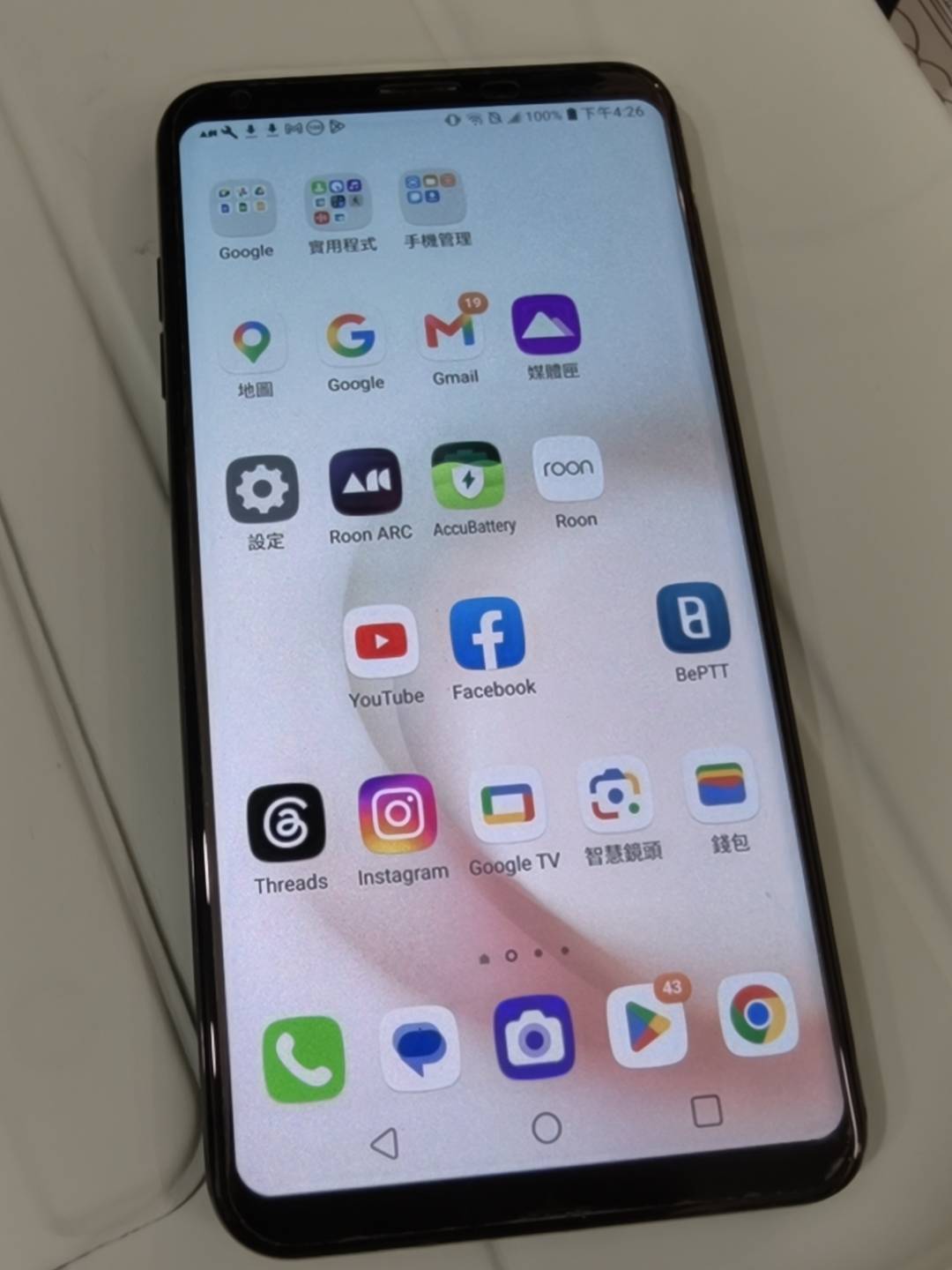
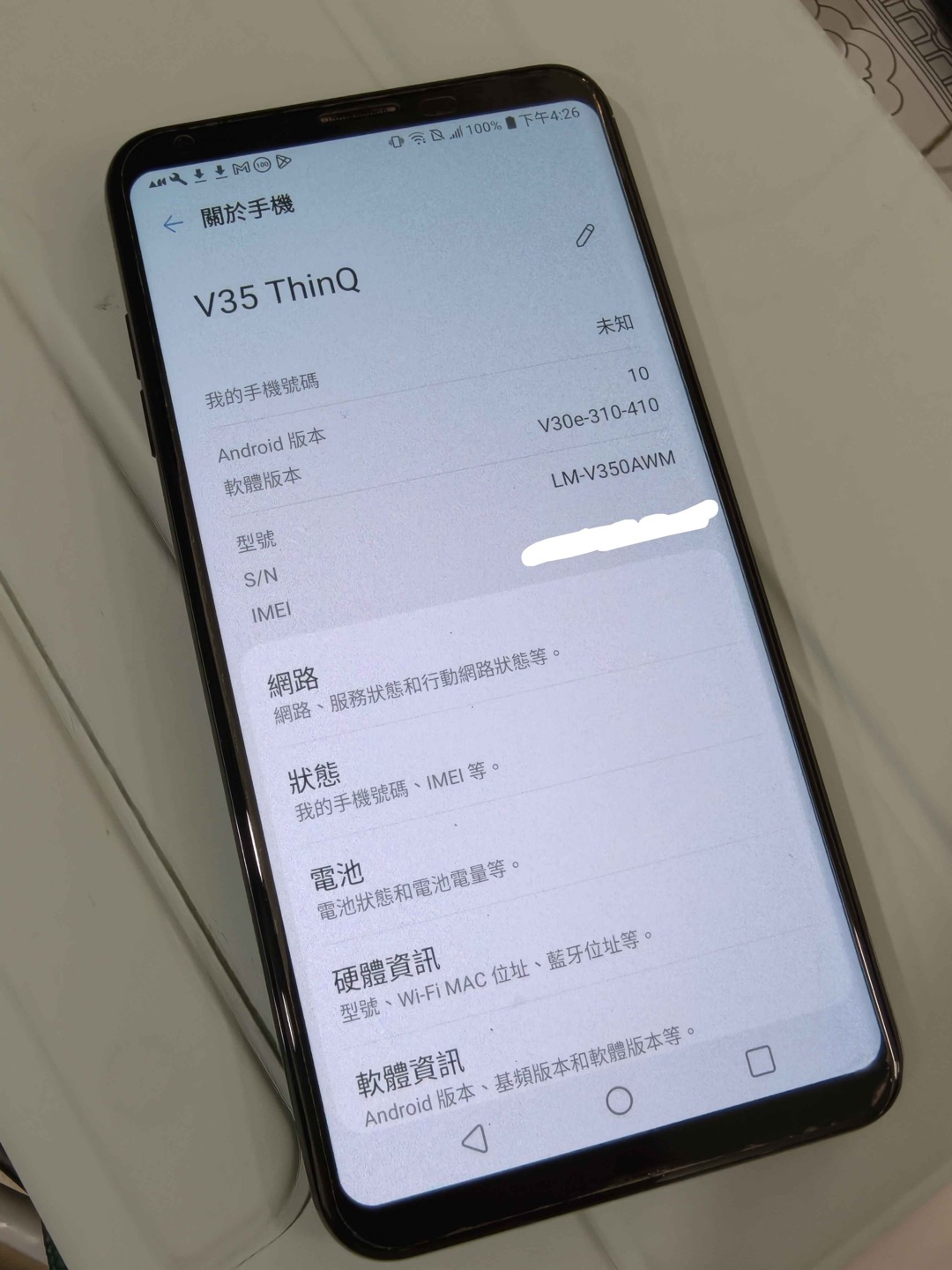
After moving to Android 10, scrolling through the UI feels smoother than it did on Android 9.
Plans for part 2
- Remove the Google account from the phone, so Factory Reset Protection doesn't get triggered
- Use EDL to write Lineage Recovery (the official boot.img) to boot_a and boot_b; no root needed
- In Lineage Recovery, sideload copy-partitions to copy slot b to slot a (this overwrites the Pie on slot a)
- Format data, sideload LineageOS 22.2, then sideload MindTheGapps
- Check the DAC panel, Wi-Fi, and whether the apps I want to test can be installed
- Next time I'm in EDL, actually run the cleaned-up
read_lunonce (for example, re-read a small partition and compare its SHA-256), then change 🧪 to ✅
Neither of the two things that took the most time this round was the writing itself: one was that you can't let go of the buttons at any point while getting into EDL, and the other was that edl reconnects on every call, so things only got stable once I read each LUN's partitions in one call.
References
Official:
- LineageOS Wiki: LG V35 ThinQ (judyp)
- LineageOS install guide (Android 10 firmware requirement, root, copy-partitions)
- LineageOS downloads (judyp)
- LineageOS GApps page
- MindTheGapps 15.0.0 arm64
- LineageOS device source (Quad DAC support): android_device_lge_judyp, android_device_lge_sdm845-common, android_hardware_lge (dac_panel)
Tools:
- bkerler/edl (open-source Qualcomm EDL tool, GPL-3.0)
- bkerler/Loaders (LG SDM845 firehose)
- edl issue #752 (reconnecting triggers USB Overflow)
- edl issue #103 (USB Overflow on the LG G6)
Guides and discussions:
- kaneorotar: LG V35 Tinkering Instructions (EDL, unlocking, TWRP)
- XDA: V350ULM Oreo 10i / ULM Pie 20f / AWM30e final Q download roundup
- XDA: V350AWM30e ATT_US stock & rooted partitions (original source of the 30e partition pack)
- XDA: V350AWM30e android 10 stuck in fastboot (a case of going from 30e back to Pie 20f)
- XDA: Official LineageOS for the LG V35 ThinQ
- Nemo community: LG V35 bootloader unlock tutorial (Chinese; EDL combo: hold power + volume down without letting go, tap volume up when the screen goes black)
- Nemo community: LG V35 9008 unbrick tutorial (Chinese)
- Nemo community: Feiyu ROM 30a (Chinese; looked into but not used)
Firmware databases: